
What is n8n? Workflow automation explained
n8n is a tool that connects your apps: a trigger starts a workflow, several steps run on their own, and the result lands where you need it. You build it by clicking on a canvas, not by writing code. This guide covers what n8n does, what it costs, whether to use the cloud or your own server, and what three typical flows for freelancers look like.
The short version
- n8n automates flows between apps: email, spreadsheets, calendar, website, social media, AI models. One trigger, several steps, one result.
- The cloud plan costs 20 dollars or euros a month billed annually, with 2,500 runs; there is a free trial first, no credit card needed. On your own server, the Community Edition is free, but you handle hosting and updates yourself.
- You don't need AI for every flow. Passing data along, publishing posts, filing receipts: none of that needs a model. AI joins in when something has to be read, summarized or written.
- Start with one flow that repeats every week. Below are three you can rebuild.
n8n Cloud: free trial with no credit card, then from 20 dollars or euros a month billed annually.
Try n8n Cloud*Affiliate link: I earn a commission, nothing changes for you.
What n8n is, in three terms
Every workflow in n8n is made of the same three things. Once you know them, every template and tutorial makes sense.
- Trigger: the event that starts the flow. A new email, a submitted form on your website, a new row in a spreadsheet, or simply a schedule, say every Monday at eight.
- Steps: what happens next, one after another. n8n calls them nodes. One step fetches data, one transforms it, one sends it on. AI steps belong here too: they summarize a text or draft a reply.
- Connections: the apps n8n can talk to. Common services have ready-made building blocks, everything else goes through a generic interface. According to the pricing page, all connections are included in every plan.
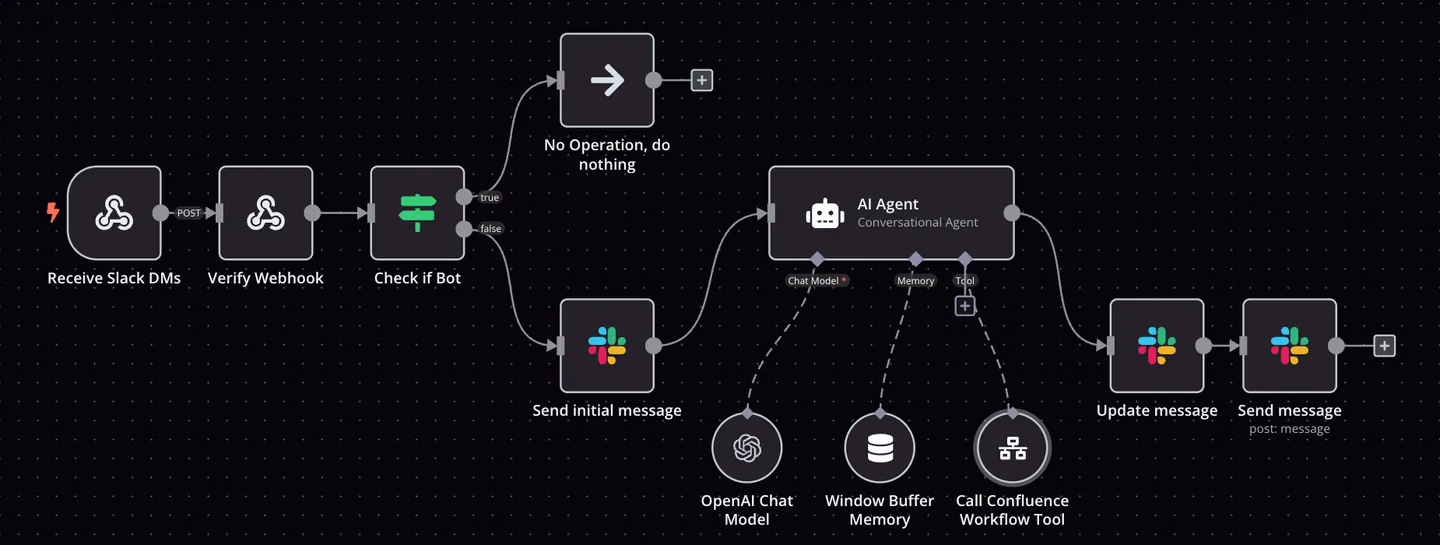
A few facts before it gets concrete:
| Maker | n8n GmbH, Berlin, founded in 2019 by Jan Oberhauser (per the press page and the imprint) |
| Pronunciation | “n eight n”, always lowercase (per the press page) |
| Hosting | as n8n Cloud, hosted by n8n in Frankfurt, or self-hosted on your own server |
| Community Edition license | Sustainable Use License, a fair-code model. n8n deliberately does not call itself open source |
| AI | AI steps, agents and MCP are included in the smallest cloud plan, per the pricing page |
Three example flows
These are flows that save freelancers real time. Each has a trigger, two or three steps and a result. Two of them you can rebuild as they are; the third runs like this in a client project.
1. A website enquiry becomes a ready-made card
The contact form on your website sends every enquiry to n8n. Instead of a raw email you get a sorted card with everything you need to reply.
- TriggerForm submitted
Your website reports the new enquiry to n8n via a webhook.
- StepInto the spreadsheet
Name, request and date land in your client list, for example in Google Sheets.
- StepAI summarizes
An AI step reads the enquiry, states the request in one sentence and drafts a reply.
- ResultA card in your inbox
An email with summary, draft and a link to the spreadsheet row. Replying is still your job.
2. Recording in, summary and three post ideas out
You record a client call, a talk or a voice note. n8n turns it into minutes and three post suggestions you only have to check.
- TriggerNew file in a folder
You drop the recording into a cloud folder, n8n notices the new file.
- StepTranscribe
A transcription step turns audio into text, locally on your machine if you prefer.
- StepAI condenses
A summary with decisions and open points, plus three post ideas in your style.
- ResultDocument plus drafts
Minutes and drafts land in your notes app or arrive by email.
3. Handing posts over to Metricool
This flow runs like this in a client project: finished posts come out of a fixed process, n8n hands them to Metricool, and Metricool publishes them on the channels at the scheduled time. Nobody copies text into planning tools any more.
- TriggerPost is ready
Text, image and date are in place and the post is approved.
- Stepn8n bundles
n8n takes text, image and date and checks that nothing is missing.
- StepHand-over to Metricool
n8n creates the post as a scheduled post in the Metricool calendar.
- ResultPublished on time
Metricool publishes automatically. The calendar shows what goes out when.
Notice what the three have in common? None of them replaces your decision. They take the sorting, retyping and copying off your hands and put the result in front of you.
n8n Cloud or self-hosted?
Both are the same software. The difference is who runs the server. The numbers come from the n8n pricing page and the license page, as of October 24, 2026.
| n8n Cloud, Starter plan | Community Edition, self-hosted | |
|---|---|---|
| Price | 20 dollars or euros a month, billed annually | Free, you only pay for your server |
| Scope | 2,500 runs a month, unlimited steps per run | No limit set by n8n, only by your server |
| Hosting | n8n hosts it; data stored in the EU in Frankfurt, per n8n | You install, back up and update yourself |
| Getting started | Free trial, no credit card | Install following n8n's guide, for example with Docker |
| License | Subscription | Sustainable Use License: free for your own business and personal use, not for reselling as a service |
| Who it suits | Anyone who wants to start without running a server | Anyone who knows Docker and wants all data at home |
A run, per n8n, is one complete execution of your workflow, no matter how many steps it has. Flow 1 above uses one run per enquiry. 2,500 a month goes a long way for a freelancer; the next plan, Pro, with 10,000 runs costs 50 dollars or euros a month.
My take: if you are using n8n for the first time, start in the cloud. Everything that can go wrong with a server is gone, and after an hour you know whether the way of working suits you. If you already run a server, save the fee.
n8n Cloud
Free trial with no credit card, then from 20 dollars or euros a month billed annually. n8n runs the server.
Community Edition
Free, runs on your own server. You handle installation and updates yourself.
Do you need AI for automation at all?
Often not. If a flow runs the same way every time, say moving data from one tool to the next or publishing posts at fixed times, n8n without an AI step is enough. AI joins in only when content has to be understood, summarized or written, as in flows 1 and 2. Flow 3 does without. Which model you pick for the AI steps is secondary; how to decide is in the guide ChatGPT, Claude or Gemini.
Where to start
One task that repeats
Pick something you do by hand every week and that annoys you. Not the biggest task, the most frequent.
Name the trigger and the result
What starts the flow, and what should end up where? If you can say it in one sentence, the task is ready.
Build with two steps, then extend
First the trigger and one step, test, then the next step. That way you find mistakes while they are small.
That is exactly how I work with clients: first the task, then the tool. What that looks like as guided work is on AI for freelancers.
Frequently asked questions
Partly. The self-hosted Community Edition is free, but you need your own server or machine and you take care of installation and updates. n8n Cloud costs 20 dollars or euros a month on the Starter plan, billed annually, with 2,500 runs included. Before subscribing there is a free trial without a credit card (n8n pricing page, as of October 24, 2026).
For getting started, the cloud. You don't have to look after anything and you quickly see whether the way of working suits you. Self-hosting pays off if you already run a server, know Docker, or want to keep all data with you. The Community Edition license allows use for your own business purposes.
For most flows, no. You put triggers and steps together by clicking and tell n8n which data goes where. A basic feel for how data is structured helps, meaning what a field and what a record is. If you can code, you can add code steps in n8n, but you don't have to.
One complete run of your workflow, from trigger to result, regardless of how many steps are in between. That is how n8n describes it on its pricing page. A flow that runs once a day comes to about 30 executions a month. The Starter plan includes 2,500.
Yes. n8n has its own AI steps that call a language model, plus building blocks for agents and the Model Context Protocol. According to the pricing page they are included from the Starter plan. Depending on the provider you need your own access to the models; n8n provides some in the cloud without your own key.
“n eight n”, always written in lowercase. That is how n8n puts it on its own press page. The company is based in Berlin and was founded in 2019 by Jan Oberhauser.
Sources
Retrieved on October 24, 2026.
Related
Which flow would be your first?
In a free first call we look at which of your tasks suits n8n and whether you need AI for it at all. 15 minutes, online.
Book Free Consultation