Chapter summary
This page currently uses an editorial chapter summary. The subtitle files are prepared separately for YouTube.
00:00 One prompt, three animations
Nobody animated these clips by hand. Each one came from a single prompt in Claude Code running Opus 5.5. Lukas copied the first prompt exactly, then swapped style and story twice: pixel art, and a chalkboard drawing that loops. What surprised him most is the range that comes out of one prompt each. The video shows every prompt and every result.
00:34 The setup: Claude Code with Opus 5.5 on extra high
The tests run in Claude Code with Opus 5.5 and the effort set to extra high. For this kind of task Lukas considers that the best setting. Max is not needed, and high would probably have been enough, he just wanted to make sure the setting was not what held the test back.
00:52 The copied prompt: a factory that makes sunsets
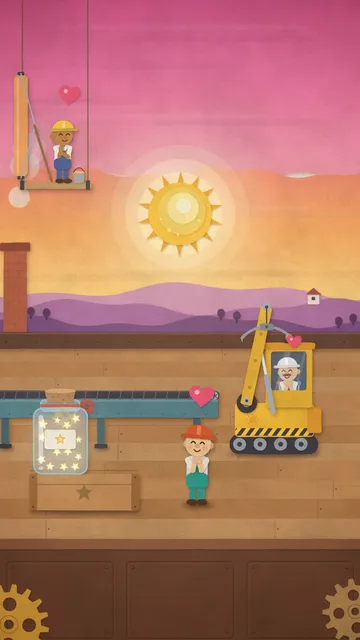
The first prompt comes from Ole Lehmann, who showed the result in his Reel from September 24, and goes in unchanged: a 20-second animation of a tiny factory where workers roll a sun along a conveyor belt, paint the sky and lift the sun into place with a crane, until a knocked-over jar of stars turns everything into night. The most important part sits at the end: the animation has to be made entirely with code, Claude sets up its own rendering tools and exports a finished MP4 at 1080x1920 for Instagram Reels. To start, Claude checks what is already on the machine: Python, ffmpeg and graphics libraries.
01:47 Claude checks its own frames and fixes them
Claude renders test frames at the key moments of the story and puts them together into contact sheets. Its first verdict is self-critical: the paper-cut style works, but the characters and the jar of stars are too small in the wide shot to read on a phone. Before fixing anything it checks the second half, then it zooms into single frames and later measures the audio levels. The result is a 20-second Reel with sound, no narration and no title card, drawn with the Python library skia-python: hand-cut edges, a generated paper texture, soft shadows and puppet characters with jointed limbs.
03:28 Result 1: the paper-cut sunset factory
The Reel plays full screen with sound. Lukas' verdict: it worked, with exactly the prompt from Ole's Reel. The story is the same, the details differ. That is normal: the same prompt gives a slightly different result on every run, sometimes better, sometimes worse.
04:34 My own prompt: a pixel art dungeon
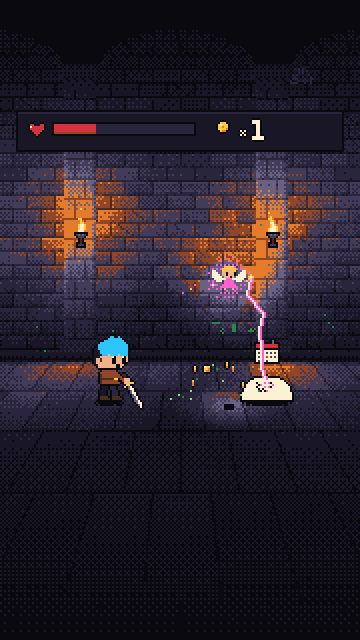
For the second test Lukas keeps the structure of the first prompt and swaps style and story: pixel art in 16 colors, a small hero with blue hair, three friendly slime monsters with an envelope, an invoice and a calendar. The hero fights the first one and gets tired, then a fairy appears and handles the rest. The fairy stands for an AI agent that takes the tedious work off your hands. This prompt is far more detailed than the first, down to resolution, frame rate and the waveforms of the chiptune sounds.
05:44 Claude catches its own mistakes
This run takes a while. Again Claude checks frame by frame and names concrete problems: the poof at the end turns into a dirty gray dither cloud, and the fairy's glow is too dense. It fixes both before exporting. The sound is brought to -14 LUFS, a common loudness target for social video.
06:28 Result 2: the fairy that clears the dungeon
Every story beat lands, down to the hero shrugging before he lies down in a hammock while the fairy keeps clearing slimes in the background. For Lukas this is the favorite and an absolute banger: 20 seconds, fully animated, with sound effects, from text alone. One possible next test: the same prompts with GPT-6.
08:10 Test 3: a looping chalkboard animation
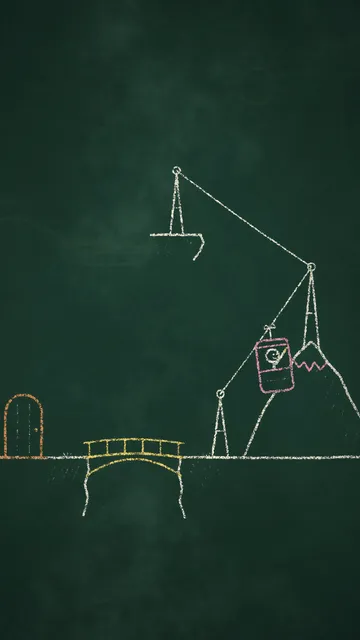
The third prompt tests two things at once: a completely different style and a seamless loop. A little stick figure solves every obstacle by drawing the solution himself: a bridge, a cable car, a boat. At the top, a drawn hand with a sponge wipes the board clean, and the figure draws himself a new door and disappears. Lukas sees chalkboard styles like this as interesting for faceless YouTube channels with explainer videos, for example.
08:55 An hour of work and 434,000 tokens
This run took the longest, about an hour, possibly also because Claude had some hiccups that day. The token display is the surprise: at the end the context stood at about 434,000 tokens. That is because Claude mostly writes and runs Python scripts, so the actual rendering happens outside the AI. As a possible further test Lukas mentions running the same prompts with Sonnet 5.5, released on September 28, once the tools and the prompt are set up in a project.
10:18 Result 3: does the loop hold?
The clip first plays through once. One thing strikes Lukas as odd: the wiping hand is a chalk drawing too, a real hand would have been funnier. That is what the prompt asked for, though. Then he switches the loop on: the transition almost works, but Lukas would trim a few milliseconds at the start and the end or let the loop run from door to door. Claude itself reports about half a second of still frames around the loop point.
11:51 My verdict and the next project
Lukas would still refine the loop, but he already finds it pretty good, and he is impressed by what Claude builds with code alone. One of his next larger projects: testing whether a faceless YouTube channel can be built on Claude Code animations alone. He will probably show his content studio, which publishes his content to Instagram, TikTok and other channels, in one of the next videos.